Key Features






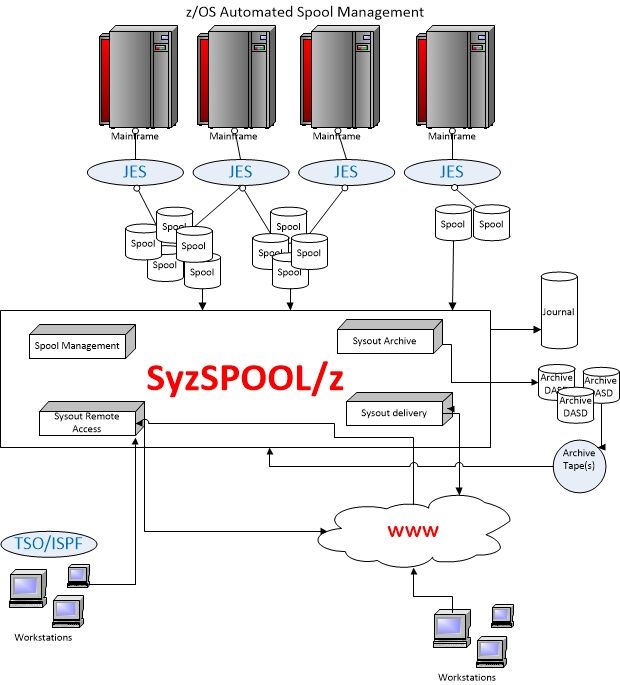
Where SyzSPOOL/z Delivers
SyzSPOOL/z addresses mission-critical spool challenges while strengthening compliance and audit readiness.
- Compliance Archiving: Retain SYSOUT for mandated periods with indexed, tamper-evident storage.
- Audit Investigations: Rapidly locate jobs and DDs by content, owner, class, or time frame.
- Disaster Recovery & Spool Relief: Reduce spool footprint and restore only what’s needed.
- Historical Access: Provide long-term, secure access to legacy reports in tet format and even as PDFs. Also interfaces with DF/HSM, FDR/ABR and DMS, plus has internal archive capability.
- Cross-Application Traceability: Follow related outputs across systems and time.
Technical Requirements
Platform: z/OS 2.3 and later (including 3.2+). JES2 environments supported.
Security: RACF, ACF2, or CA Top Secret for authentication/authorization; SAF calls used.
Storage: DASD or virtual tape for archives; supports tiered storage and external backup tools.
Access: ISPF dialog; optional web component for browser-based PDF access (modern browsers).
Networking: TCP/IP for web access; HTTPS recommended.
Sizing: Guidance provided during installation based on job volume, report sizes, and retention policies.
Security: RACF, ACF2, or CA Top Secret for authentication/authorization; SAF calls used.
Storage: DASD or virtual tape for archives; supports tiered storage and external backup tools.
Access: ISPF dialog; optional web component for browser-based PDF access (modern browsers).
Networking: TCP/IP for web access; HTTPS recommended.
Sizing: Guidance provided during installation based on job volume, report sizes, and retention policies.
Integrations



Screenshots and Diagrams


Licensing and Support
Licensing: Flexible physical Site, CPC or LPAR based licensing, with free support for single DR site.
Maintenance & Updates: Annual maintenance includes updates, fixes, and compatibility support for new z/OS levels.
Support: Expert assistance via email and phone with fast response SLAs. Contact: ClientSupport(@)SyzygyInc(dot)com, Phone: (800) 767-2244.
Onboarding: Guided installation, configuration templates, and verification checklists.
Maintenance & Updates: Annual maintenance includes updates, fixes, and compatibility support for new z/OS levels.
Support: Expert assistance via email and phone with fast response SLAs. Contact: ClientSupport(@)SyzygyInc(dot)com, Phone: (800) 767-2244.
Onboarding: Guided installation, configuration templates, and verification checklists.
Resources
Find documentation, release notes, and downloads in our Support portal.
Our 30–45 minute demo covers installation approach, JES2 integration, offload/reload workflow, indexing and search, PDF/web access, and security controls. We’ll tailor it to your environment and volume.